【产品描述】
Faster, Smoother Vocal Tuning to a Whole New Groove
RePitch 2 brings a modernized UI, a smoother workflow, and powerful new tools that make vocal editing faster, more transparent, and more musical.
Tune vocals with unmatched transparency, snap performances to the groove with SmartAttack, and edit multiple tracks side by side in one unified view – all designed to keep you focused on creativity, not corrections.
Features
NEW! Floating tool bar
NEW! Improved note editing
NEW! Improved UI
NEW! SmartAttack
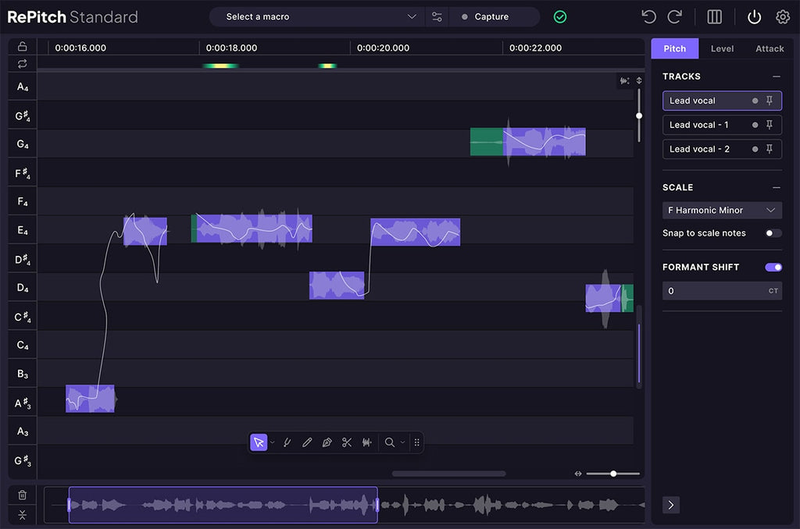
NEW! Multi-track editing
Pitch analysis
Tuning macros
Multi-region editing mode
Time editing
Center Notes Tool
Split Tool
Shaper Tool
Draw Tool
Smooth Join
Warp Points Tool
Formant Shift
Level Display
SynchroLink enabled (connection with VocAlign 6 Pro)
ARA2-compatible (including Pro Tools)
SmartAttack
RePitch 2 Standard introduces SmartAttack, a breakthrough tool that intelligently detects and aligns vocal phrasing to the grid – without sacrificing the natural character of the performance.
It automatically adjusts note starts for tighter timing, making it easier than ever to achieve polished, professional results while keeping vocals feeling authentic and expressive.
Multi-Track Editing
Edit multiple vocal takes side by side in a single unified view.
Multi-track editing lets you visualize harmonies, doubles, and stacks all at once, making it simple to align timing, pitch, and expression across performances.
Perfect for vocal producers and engineers working with layered arrangements, this update speeds up editing and improves consistency across tracks.
Floating Toolbar
RePitch 2 introduces a new floating toolbar that keeps all your essential tuning tools just a click away.
Designed for speed and flexibility, it lets users access pitch, timing, and correction controls from anywhere in the workspace – streamlining the creative flow from start to finish.
Improved Note Editing
Editing has never been smoother.
RePitch 2 now offers more fluid note control – making it easy to move, resize, or delete notes with precision.
Enhanced snapping and visual feedback help artists make faster, more musical decisions during tuning sessions.
Reimagined Interface
The updated interface delivers a modernized look with improved clarity and visual contrast.
Users can better visualize pitch curves and transitions, while the cleaner layout minimizes distractions and enhances focus during editing.
Faster Navigation and Hotkeys
Efficiency takes a leap forward with new hotkeys and navigation improvements.
Producers and engineers can zoom, scroll, and adjust notes faster than ever, cutting down on repetitive actions and making RePitch 2 Elements a more responsive, production-ready tool for professionals.